Is ELYWARE Video Mixer free?
Yes. Video Mixer is a free public beta with no account, subscription, watermark or telemetry.
What does a live video mixer do?
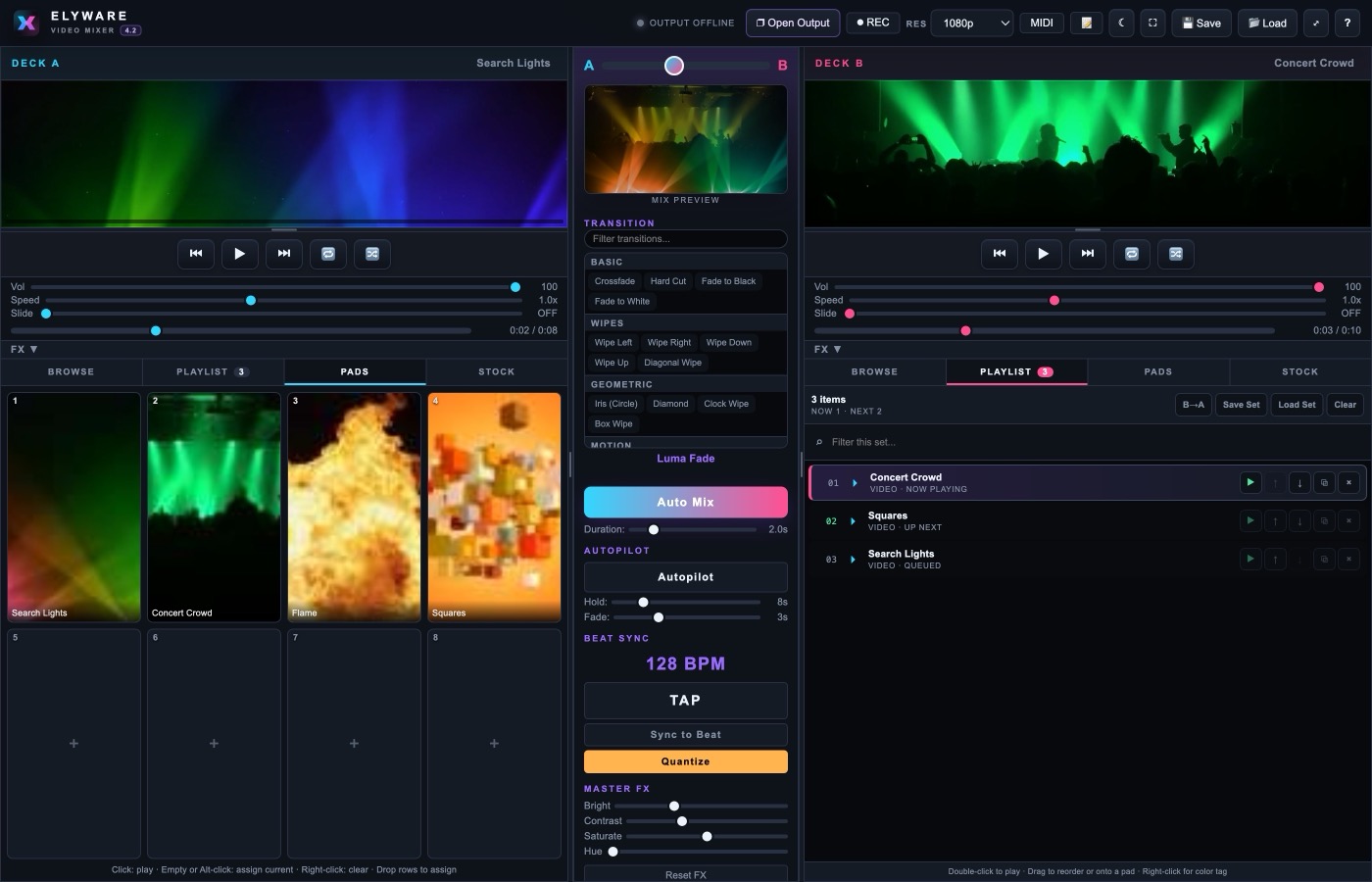
A live video mixer lets you cue visual media on separate decks and blend between them in real time. ELYWARE Video Mixer plays local videos, images and stock clips, applies transitions and sends the final mix to a separate display or projector window.
Does Video Mixer work on Mac, Windows and Linux?
Yes. Mac users get a self-contained universal app for Apple Silicon and Intel Macs running macOS 11 or later. The Windows and Linux editions require Python 3 and a modern browser.
Why does macOS say the developer cannot be verified?
The beta is not yet signed with an Apple Developer ID or notarized by Apple, so macOS cannot confirm who built it. It is not a detection of anything harmful. On macOS 15 and later the old right-click › Open trick no longer works: click Done on the warning, then go to System Settings › Privacy & Security and click Open Anyway. Or run xattr -dr com.apple.quarantine "/Applications/Video Mixer.app" in Terminal. Verify the download against the SHA-256 published above, and only download from elyware.net.
Does Video Mixer upload my media?
No. Your own media files are read locally and never leave your computer. The stock video feature sends search queries to Pixabay's public API to find royalty-free clips. Those clips download to a local cache folder on your machine.
Windows says the file is unsafe or unrecognised. Is it?
No. The Windows package contains Python source and a .bat launcher, not a compiled executable, and it is not signed with a Windows code-signing certificate. SmartScreen warns about any installer it has not seen often, which for a small independent release means every download. Right-click the ZIP, choose Properties, tick Unblock and click OK before extracting, then choose More info and Run anyway if SmartScreen appears. Check the SHA-256 published on this page against your download if you want to confirm the file is intact.
Stock search says "Could not reach Pixabay." How do I fix it?
Update to v4.5.1 or later. Earlier Mac app builds looked for security certificates inside a python.org Python install, so on most Macs every connection to Pixabay failed even though the internet and the API key were fine. v4.5.1 uses the certificates macOS already has. If you can't update yet, quit Video Mixer and start it from Terminal with SSL_CERT_FILE=/etc/ssl/cert.pem "/Applications/Video Mixer.app/Contents/MacOS/Video Mixer".
My Pixabay API key is being rejected. What do I do?
Paste the key again on v4.5 or later. Pixabay's documentation page shows your key inside a full example URL, so it is easy to copy https://pixabay.com/api/?key=... instead of the key alone. Older builds rejected that with a generic error. v4.5 accepts the whole URL, a key=VALUE fragment, surrounding quotes, and invisible characters picked up from a web copy, and pulls the key out for you. If a key is genuinely wrong, the app now tells you exactly why.
What is the Create a Slide composer?
New in v4.5. Build a title card or message inside the mixer with a live 16:9 preview, multiline text, and twelve looping backgrounds such as bars, checker, grid, rings and polygons. Adjust colors, motion speed and hue cycling, then queue the slide or play it straight to a deck. Slides travel with playlists, saved sets, sessions, clip pads, recordings and the output window.
Do videos still show a black frame when they loop?
No. Since v4.6, looping cuts on the exact frame. A second decoder starts the next pass of the clip early by exactly its measured start-up time, so the first frame arrives as the last frame ends. No black frame, no held frame and no dissolve, so clips made to loop repeat with no visible seam, in the deck previews, the mix, recordings and the projector output.
What is the stock video browser?
The Stock tab on each deck searches Pixabay for royalty-free video clips. You provide your own free Pixabay API key. Clips download and cache locally before they can play, so they work like any other local video file once cached.
Can Video Mixer record the finished mix?
Yes, as of v4.2. Press R or the REC button to record the program output to a WebM video file. The recording captures the mixed video only and does not include program audio. Live streaming to a platform is not supported. Sending the mix to a Screenfolk player goes to that one screen, not to a public stream.
Can I use a MIDI controller with Video Mixer?
Yes. v4.2 adds MIDI mapping with a learn mode. Open the MIDI panel, click Learn next to a control, then move a knob, fader or pad. You can map the crossfader, deck volumes and transports, Auto Mix, Autopilot, tap tempo, quantize, record and all sixteen clip pads. Mappings persist between sessions. This needs a browser with Web MIDI support such as Chrome or Edge.
Is there a Pixabay plugin for Resolume?
Resolume has no official Pixabay plugin, and its FFGL plugin format is built for GPU effects and generators rather than stock footage browsing. ELYWARE fills that gap with the Stock Bridge for Resolume, a free companion app that searches Pixabay, caches the clip locally, then loads it straight into a Resolume Arena or Avenue clip slot through the Resolume REST API.
Can I control Video Mixer from a Stream Deck or a script?
Yes. v4.2 adds a local REST control API. POST to http://127.0.0.1:5555/api/control/ plus an action such as crossfader, automix, deck, pad, transition, autopilot, record, tap or fx. A GET to /api/control lists every action and /api/control/status returns a live snapshot. The API only accepts requests from your own machine.
What are clip pads?
Each deck has eight pad slots with automatic thumbnails. Click a pad to swap the live clip on that deck instantly without disturbing the playlist. Assign a pad by clicking an empty one, Alt-clicking a filled one, or dragging a row from the browser or playlist. With Quantize armed, pad triggers wait for the next beat.
Can I use it with a projector or second monitor?
Yes. Open the dedicated Output Window, move it to the projector or second display, and switch that window to full screen. Your mixer controls remain on the main screen. For screens without a cable run, send the mix to a TV running the Screenfolk player with the mixer’s Screenfolk button.
Can I cast the mix wirelessly to a TV or video wall?
Yes. TVs running the Screenfolk player can show the Video Mixer program wirelessly. In the Screenfolk dashboard, choose Live mixer on the player to get a one-time code, then choose Screenfolk in the mixer, enter the code and connect. The audience sees only the finished mix. No HDMI cable or capture card is required. The feed is video only for now. Screenfolk is digital signage software from Greeley, Colorado.